
Under construction · Testing mode

Plan several routes at once and compare them side by side.

Draw several cycling, running or hiking routes and their variants at once, compare them on up to three maps and in their elevation profiles, and check the weather along the way - all in your browser.

Free while in testing · Nothing to install · In 10 languages

Everything a route plan needs

What you would otherwise piece together from several apps, in one place.

  • Several routes at once

    Up to five routes and their variants, each in its own colour, on the map together.

  • Up to three maps

    Plan on one map and check the ground on another - side by side, moving together.

  • The magic lens

    Another map in a circle under the pointer: aerial imagery over the outdoor map, or what lies under the heatmap - without switching anything.

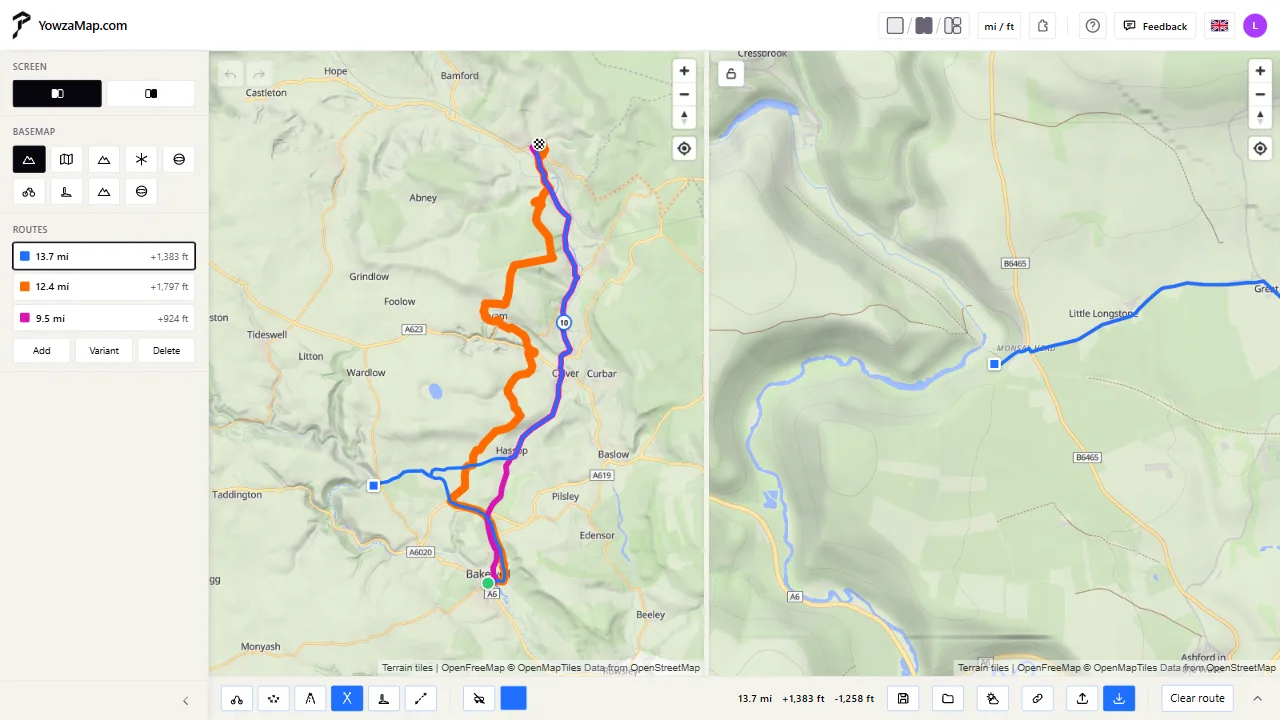
Three variants of one ride on two maps side by side: the whole ride, and a close look where they part
  • Maps for the outdoors

    Our own map with shaded hills and contour lines, plus maps from Mapy.com, Thunderforest and Mapbox.

  • Routes along real paths

    Routed for MTB, gravel, road, touring or hiking - or a straight line where there's no path.

  • Shape it your way

    Grab the route and drag it where you want to go; every stretch can have its own profile.

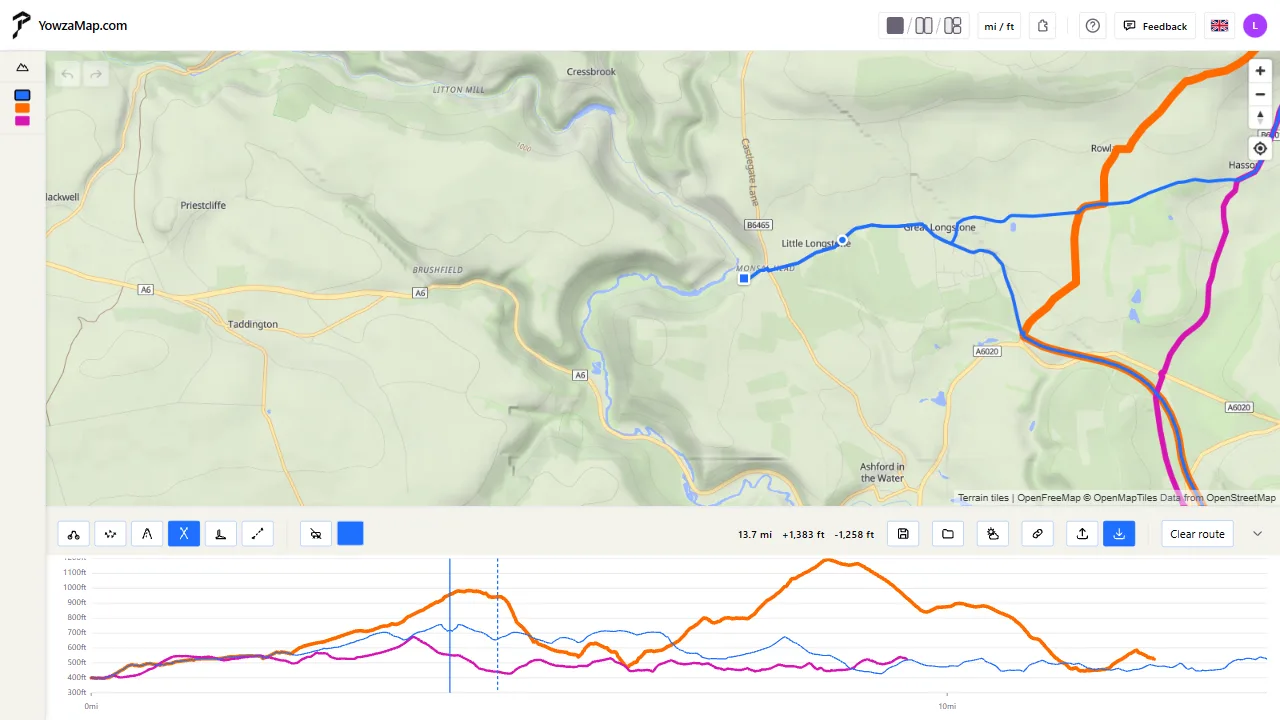
A route close up with its elevation profile below, a spot picked in the profile shown on the map
  • Elevation profiles

    Every route's climbs in one chart - point into it and see the place on every map.

  • Weather along the way

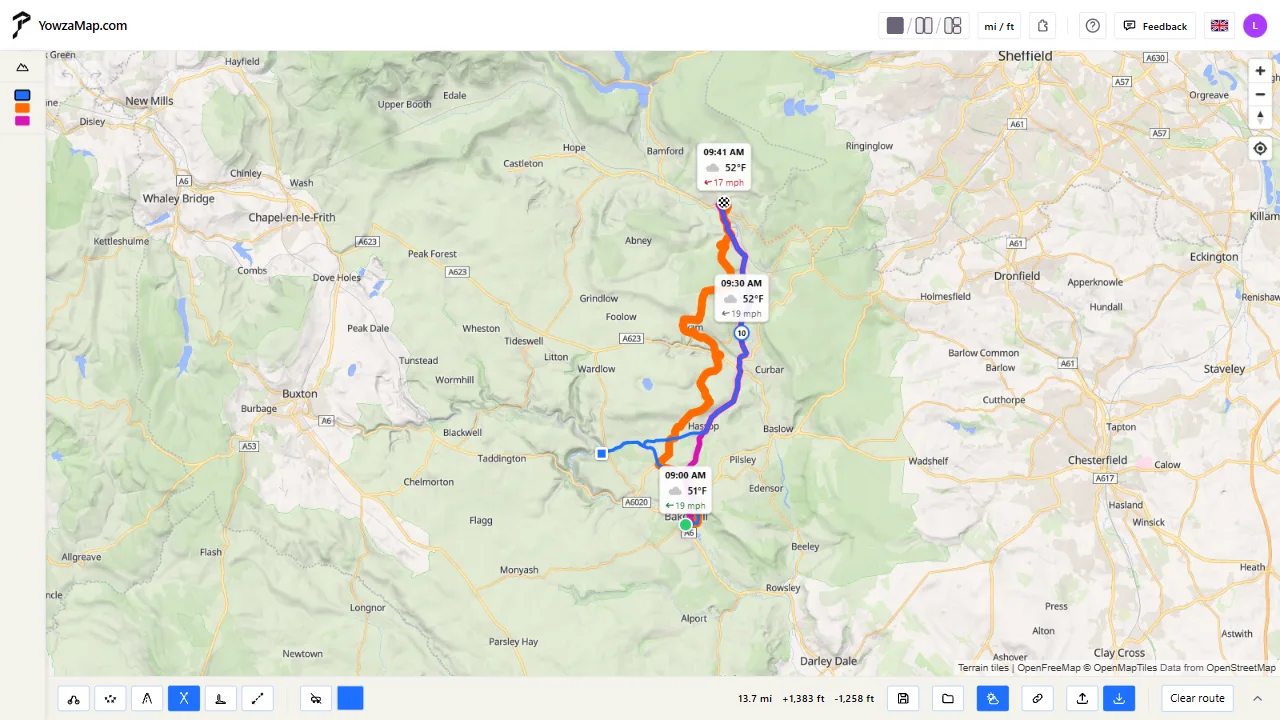
    Say when you set off and how fast you go, and see the forecast for the time you reach each place.

  • Save, share, import

    Keep routes with your account, share them by link, and bring in GPX files - even a whole ZIP of them.

The weather along a route: temperature and wind at the time you get to each place
  • Strava heatmap

    With the free YowzaMap Heatmap extension, see where people really ride and run.

  • Compare the variants

    Routes side by side: length, climbing, the steepest stretch, the time it takes and what they run on - tarmac, gravel or trail.

  • Routing your way

    How much off-road, steep climbs or not, forest or unpaved ways - tune each profile and the routes follow.

  • Plan together

    Instead of sharing your screen in a call, everyone has the map live on their own. You pass the planning around and each of you draws a variant of your own.

How it works

  1. Draw

    Pick a profile and click the map: the route finds its way along real roads and paths.

  2. Compare

    Add variants, open more maps, lay the elevation profiles over each other and check the weather.

  3. Go

    Save the plan, share it by link, or download GPX for your bike computer, watch or phone.

In more detail

Plan and compare

YowzaMap is made for the moment you're choosing which way to go. Draw a route, make a variant, and see the difference in distance, climbing and where each one leads.

  • Up to five routes at a time, each with its own colour, distance and climbing in the side panel.
  • A variant copies the selected route - routed by another profile if you like, so you can set the gravel way against the road.
  • All elevation profiles in one chart; pointing into it marks the place on every map.
  • Undo and redo for every change, and the plan in progress kept with your account.

Plan together, even from afar

Agreeing with your friends where to ride, with everyone at home? Call each other as usual – on Teams, WhatsApp or the phone – and instead of sharing a screen, start a planning table.

  • Everyone has the map live on their own screen: they zoom in on what they need and point out the place being talked about.
  • One person plans at a time and you pass the planning around like a pencil – whoever wants to draw their idea asks for it.
  • Everyone draws a variant of their own, and in the end you have them side by side, with their length and climbing.
  • The table's chat keeps a record of what happened – who joined, who pointed out what, who planned – and you can come back to it after the table is closed.

Maps for every kind of ride

Each map shows something different. Put up to three of them side by side - they follow each other, or unlock one to look around on its own.

  • YowzaMap Outdoor - our own map with shaded hills and contour lines.
  • Mapy.com - standard, outdoor, winter and aerial maps.
  • Thunderforest - OpenCycleMap and Outdoors.
  • Mapbox - Outdoors and satellite imagery.
  • The magic lens - another map, or the same one without the heatmap, in a circle under the pointer.

Routing that knows the ground

Routes are calculated from OpenStreetMap data for the way you travel, and every stretch stays yours to change.

  • Profiles for MTB, gravel, road, touring and hiking.
  • A straight line where the map doesn't know the way - a new bridge, a track across a field.
  • Busy roads avoided with one switch.
  • Drag the route where you want it, drag a point to move it, click it to remove it; right-click the empty map to take back the last point, right-click a point to give the stretch before it another profile or to name it.

Weather along the way

Tell YowzaMap when you set off and how fast you go, breaks included, and the forecast appears along the route for the hour you get to each place.

  • Sky, temperature, rain and wind every 10 km or mile.
  • The wind set against your direction of travel - headwind, tailwind or crosswind.
  • Forecasts from MET Norway, up to 9 days ahead.

The Strava heatmap, in full detail

If you use Strava, the free YowzaMap Heatmap extension for Chrome and Edge shows the heatmap your own Strava account can see.

  • Everyone's heatmap in full detail - a free Strava account is enough.
  • Your personal heatmap on top of it, with a Strava subscription.
  • The sport, the colours and how strongly it shows are yours to choose - on the map of your choice, with a clear one beside it.
  • The extension works only with strava.com and yowzamap.com, under your own Strava sign-in.

Your routes go with you

Routes and settings are kept with your account, so the plan you start on a computer is waiting on your phone.

  • Save routes and find them again under My routes.
  • Share a saved route by a link that opens without an account - and stop sharing whenever you like.
  • Import GPX files, or a ZIP archive of up to 50 of them at once.
  • Download any route as GPX for your bike computer, watch or phone app.

Questions

Does it cost anything?
No. YowzaMap is free while it's in testing.
Do I need Strava?
No. Strava is only needed for the heatmap - and a free Strava account is enough for it.
How do I get the heatmap?
Install the free YowzaMap Heatmap extension - it works in Chrome and Edge on a computer, and the link to it is in the app once you are signed in. Then sign in to strava.com in the same browser and switch the heatmap on in the layers menu in the corner of the map.
Does it work on a phone?
Yes, in the browser, with nothing to install. The heatmap extension runs in Chrome and Edge on a computer.
Can I follow the route on my GPS?
Download it as GPX and load it into your bike computer, sports watch or navigation app.
How do I get in?
Request access by signing in with Google or Microsoft. We're letting testers in in small groups and send you an email when you're in.
Where is my data kept?
Your account, routes and settings are stored in data centres in the European Union. The privacy notice says exactly what we keep and why.

Plan your next ride, run or hike

We're still building it. For now YowzaMap is open to a small group of testers. If you'd like to try it, request access and become one.